MangoFly · self-hosted WireGuard mesh
Your own mesh VPN.
One binary, one file.
Devices connect straight to each other over WireGuard. A small coordination server tells them how to find one another and never sees their traffic — no bandwidth cost, no plaintext, nothing to decrypt.
512 MB
RAM the VM needs, Docker included
1
binary, plus one SQLite file
0
bytes of peer traffic through it
3
platforms — Windows, macOS, Linux
Direct connections
Every device reaches every other device
Peers hold encrypted WireGuard tunnels straight to one another. The coordination server tells them who exists and how to find each other, and then stays out of the way.
- Full mesh — Not a hub. Traffic between two devices takes one hop, whatever else is on the network.
- No keys on the server — It distributes public keys and addresses. It holds nothing that could decrypt a tunnel.
- Bandwidth stays flat — Data never passes through the server, so its cost does not rise with mesh traffic.
- IPv6 between peers — Supported across the mesh alongside IPv4.
NAT traversal
Connections that survive the network they are on
Most devices sit behind NAT. Peers discover their own public address from the server's reflector, exchange candidates it cannot read, and punch through to each other.
- ICE hole punching — Candidate gathering and connectivity checks between peers, not a fixed port-forward rule.
- Sealed signalling — Candidate payloads are sealed with X25519 against the peers' own WireGuard keys before the server sees them.
- Its own reflector — NAT discovery uses the server's UDP reflector. There is no public STUN dependency, ever.
- Relay fallback — When both ends are behind symmetric NAT, traffic falls back to an authenticated relay rather than failing.
Access control
Most devices never learn the others exist
Access policies are group-to-group rules, and they work by filtering the peer list itself. A device you are not permitted to reach is not something you have to be firewalled from — you were never told about it.
- Group-to-group policy — Visibility rules decide who appears in whose peer list.
- Port rules — Per-peer inbound filtering, enforced on the receiving client rather than centrally.
- Users, roles and tokens — Admin and non-admin accounts argon2-hashed, plus API tokens and service accounts for automation.
- Audit log — Enrollments, logins, policy and route changes, with source addresses.
Routing and publishing
Reach what is behind the mesh, and publish what should leave it
A device can advertise the network behind it, carry everyone's internet traffic, or expose one internal service on a public domain.
- Subnet routes — One device advertises a LAN, and the mesh reaches that range through it.
- Exit nodes — Send all internet traffic through a nominated device.
- Networks and Resources — Expose specific subnets or hosts with routing peers and policy control, rather than a whole LAN.
- Mesh DNS — Reach a peer as devicename.mesh instead of remembering a tunnel address.
What you run
One binary and one file
The coordination server is a single Rust binary with a SQLite file beside it. No database to operate, no bundled identity provider, no service mesh of its own. A 512 MB VM runs it comfortably, most of that for Docker.
- Up in one command — Point a domain at a VM, set one environment variable, and bring it up with Compose.
- Backups are a file copy — The deployment's state is the SQLite file.
- Five ports, two of them optional — 80 and 443 TCP, 8788 UDP for the reflector, and 8443/8444 only if you publish services.
- Prometheus metrics — Exported by the server, and the admin API can be restricted to the mesh itself.
Disconnected networks
It runs with no internet at all
No ACME, no public DNS, nothing outbound. The server terminates TLS from certificates you supply or mint, and NAT discovery was already using only its own reflector.
- TLS you control — Issue from your own CA, or have the server mint a self-signed certificate for the names clients will use.
- Additive trust — The certificate is added to the system store rather than replacing it, and hostname verification always runs.
- Nothing to block — There is no public STUN fallback and no telemetry callback to remember to firewall.
The console, in full
Eleven views from the desktop client — peers, policies, routes, networks, published services, workloads, DNS, users and the audit log. The network in them is a worked example, not a live deployment. Click any shot to read it full size.
1 / 11
Remote connections
From a peer in the list to a session on it
MangoFly gets you the address; MangoSSH opens the session. Right-click a peer and the protocols its operating system actually answers on are offered — the handover carries the peer's mesh address and nothing else, and a link never connects on its own.
- SSH
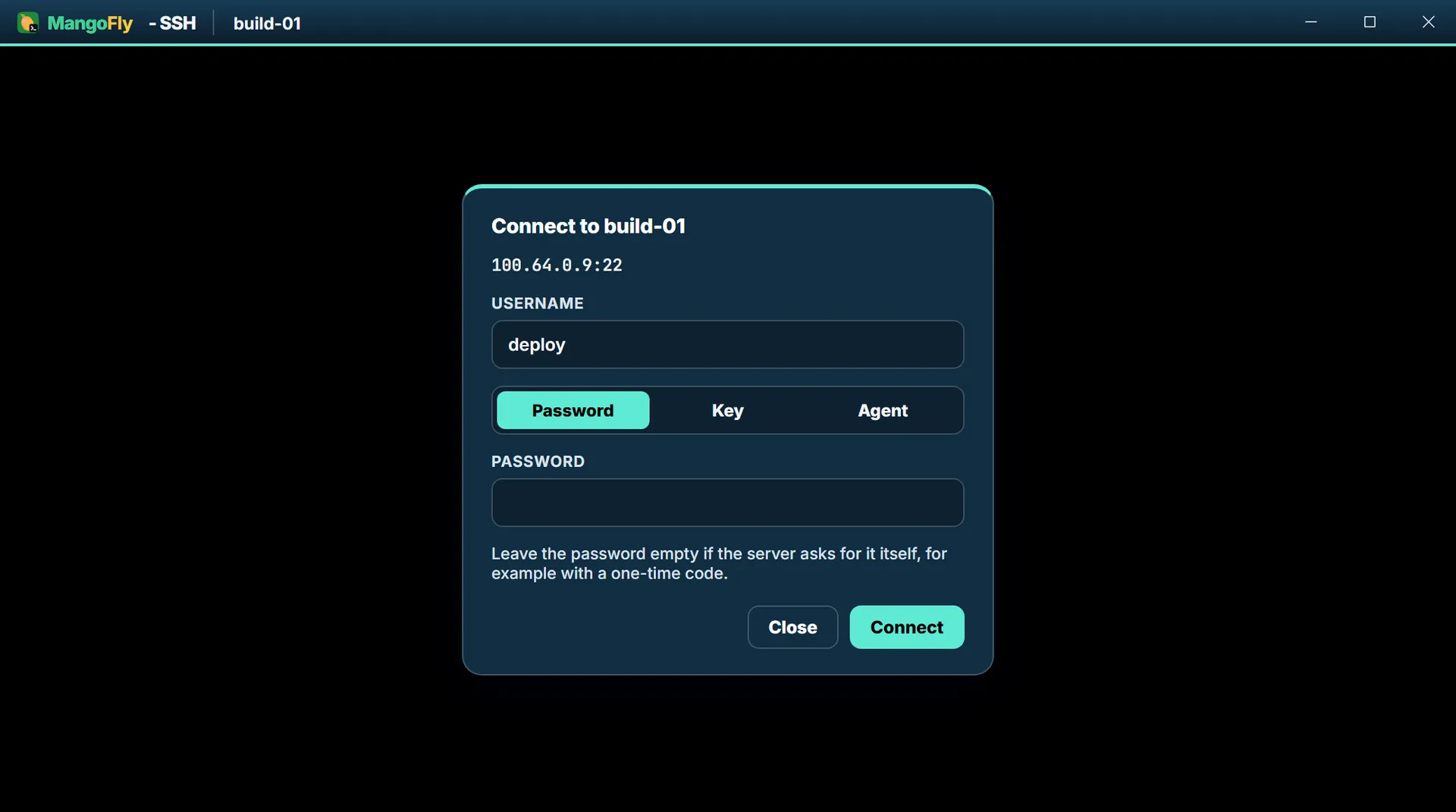
Username, then a password, a stored key or the SSH agent on this computer. The address under the title is the peer's mesh address, not a public one.
- RDP
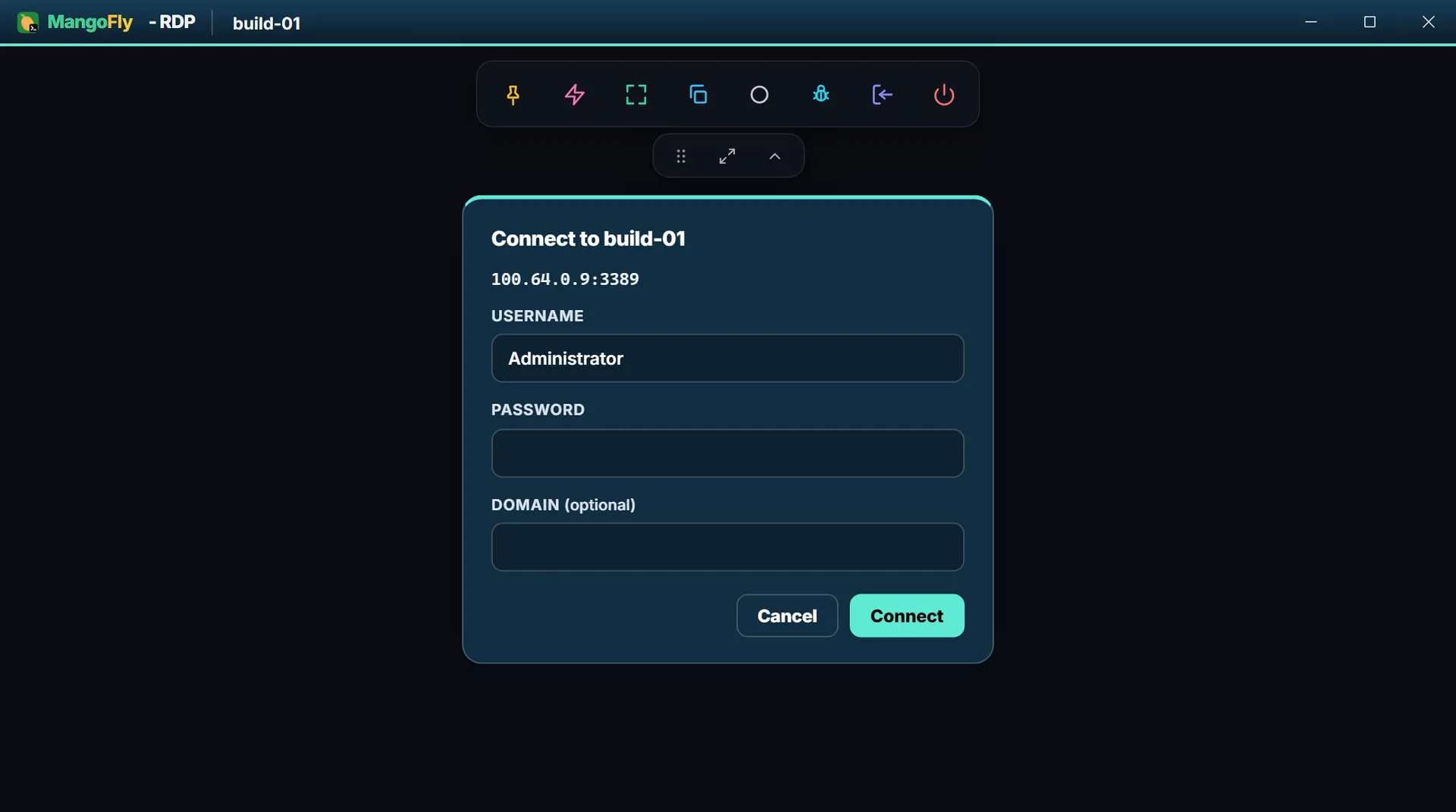
Username, password and an optional domain. The session toolbar above it pins, refits, pastes, records and disconnects.
- The protocols follow the peer — A Windows peer offers RDP and SSH. A Mac offers Screen Sharing and SSH. Linux offers SSH, VNC and RDP. An unfamiliar operating system offers all three rather than guessing wrong.
- Only the mesh address crosses — The handover takes a peer's overlay IP — it must parse as an IP address, and MangoSSH checks it again at the other end. No hostname, no path, no credential.
- A link never connects by itself — It opens a window that asks for the login. That is the window above, and it is the reason a link arriving from anywhere else cannot start a session.
- It opens as you, not as admin — MangoFly runs elevated. A program it started directly would inherit that, so the session is launched as the signed-in user instead — through your own desktop shell on Windows, and as the invoking user on macOS and Linux.
- A session host comes with it — MangoFly carries MangoSSH's session-host build and starts it by path. It registers no URL scheme, so nothing else on the machine can reach it. A full MangoSSH installation answers the link instead if you have one.
- Nothing to hide when it is absent — With neither present, the SSH, RDP and VNC actions are not shown at all. Open web page and Copy address are always offered, because those need nothing but a browser and a clipboard.
What you need to run it
A Linux VM with a public address and a domain pointing at it. One vCPU and 512 MB of RAM: the server itself uses a few megabytes, because peer traffic never passes through the box, and the rest is for Docker underneath it.
80 / TCPACME certificate challenge and the HTTP to HTTPS redirect.443 / TCPEnrollment, the peer-list WebSocket, ICE signalling and the admin API.8788 / UDPThe NAT reflector. Cannot sit behind a reverse proxy.8443 / TCPReverse Proxy in HTTP mode. Only if you use that feature.8444 / TCPReverse Proxy in TLS-passthrough mode. Optional, as above.
Open UDP 8788 at your cloud provider, not just on the VM. Every provider's convenient "allow HTTP/HTTPS" option covers only TCP 80 and 443, and nothing prompts you for the UDP rule. Its absence is invisible: TLS works, health checks return 200, devices enroll — and then peers never connect to each other.
Why this shape
Fast because it is direct
One hop between any two devices, with no relay in the middle to add latency or to meter.
Private because it has to be
The server cannot read tunnel traffic or even the signalling that sets it up. That is a property of the design, not a policy.
Yours because you run it
One binary and one file on your own VM, in your own network, air-gapped if that is what you need.
TLS without ACME
The server terminates TLS itself from operator-supplied PEM files. Issue from your own CA, or have it mint a self-signed certificate with the names and addresses you will actually use.
Trust is additive
Clients are given the certificate or your CA as a custom trust root on top of the system store. Hostname verification always runs, and there is deliberately no skip-verification option anywhere.
No public STUN, ever
NAT traversal uses only the server's own UDP reflector. There is no fallback to a public STUN service to forget to block.
Where this actually is
The project publishes its own limitations, and they are worth reading before you plan around it.
Verified on Windows and macOS
On real hardware. The Linux code paths are complete and compile, but subnet routing and exit nodes have not been exercised on a real Linux host.
ICE is new
Hole punching is covered by simulation tests including symmetric-NAT scenarios, but nomination has not yet been confirmed between two machines on separate networks.
Reverse Proxy is untested end to end
Complete and unit-tested on both server and client, but the full public-domain path has never been run against a live deployment.
Single tenant
One deployment serves one network. There is no organisation identifier anywhere in the schema.
The admin UI is the desktop client
There is no web dashboard, so administering a network means installing the client.
No cloud SSO
Directory login via LDAP or Active Directory is a Pro feature. Hosted identity providers are not supported; OIDC exists only as a preview.
Licensing
Not yet licensed for redistribution.
Pricing
Free and self-hosted. Paid if you want us behind it.
You run the coordination server yourself, it never sees your traffic, and there is no per-device charge waiting at the far end. Enterprise adds the admission controls a company tends to need, and someone to call.
Free
The mesh, on your own server.
$0self-hosted, unlimited devicesDownload- Unlimited peers, users and networks
- Group-to-group access policies and per-peer port rules
- Subnet routes, exit nodes, published services and mesh DNS
- Users, roles, API tokens and an audit log
- One binary and a SQLite file for the coordination server
- Either desktop build: the client alone, or the one carrying MangoSSH's session host for SSH, RDP and VNC
- No account with us, and no device limit to grow into
Enterprise
For companies running MangoFly in production.
Talk to usContact sales- Everything in Free, with no feature held back from it
- Device approval — an admin admits each device before it joins
- Directory login over LDAP or Active Directory, with the role taken from a group
- Support with agreed response times
- Help sizing and deploying the coordination server
- Commercial terms, invoicing and procurement paperwork
The free tier is the whole mesh, not a trial of it: unlimited devices, self-hosted, no account, and both desktop builds. Enterprise is support and the two admission controls above — it does not take anything away from Free.
Download
No account and nothing phoning home. Every release publishes checksums beside it.
Desktop client
With sessions built in
The same client, carrying MangoSSH's session host. Connect ▸ SSH, RDP or VNC on a peer opens a session window with nothing else installed — see Remote connections above. Windows only so far.
- WindowsWindows 10 and 11 · installer, with the session host bundledDownload
Server side
The coordination server, the relay and Caddy run as containers on a Linux box, installed with one command — see Install & first run in the docs.
- mangoflydThe headless client, for a machine with no desktopComing soon
Verify a download against SHA256SUMS for 0.18.0.
Windows and macOS will warn you the first time. These builds are not code-signed yet, so both show their unknown-developer dialog on first launch. Code signing is in progress. Until it lands, the SHA-256 checksums published with every release are how you confirm the file you have is the file we built.
Windows · SmartScreen
- If the browser flags the download itself, choose Keep.
- Run the installer. A blue “Windows protected your PC” dialog appears.
- Click More info, then Run anyway.
macOS · Gatekeeper
- Open the .dmg and drag the app into Applications.
- Launch it once. macOS refuses, saying the developer cannot be verified.
- Open System Settings → Privacy & Security and scroll to Security. The blocked app is named there, with an Open Anyway button.
- Click it, then confirm with Open. On macOS 14 and earlier you can instead Control-click the app and choose Open.
Self-hosting
The server is the only piece you run
One binary and a SQLite file. Peer traffic never passes through it, so a 512 MB VM is enough however much the mesh carries — and most of that is Docker, not MangoFly.
Install it
curl -fsSL https://downloads.mangossh.com/mangofly/install.sh | sudo shAsks for your domain, then writes the deployment, pulls the images and prints the admin password and a setup key. Nothing is compiled on the box.
- 1Point a domain at the VM firstCertificates are issued by ACME against the name, so it has to resolve before the install runs. The script checks, and says so rather than letting Caddy discover it two minutes later.
- 2It writes the deployment, it does not clone oneA compose file, a Caddyfile and an .env under /opt/mangofly, and a generated relay secret. Every image is pulled by tag, so nothing compiles on the box.
- 3Caddy gets the certificate on its ownYour own CA works too — the client validates against the operating system's trust store, so an internal CA needs nothing special here.
- 4It finishes with the two things you needThe admin password, generated and printed once to your terminal, and a setup key for enrolling the first device.
- 5Re-running is how you upgradeThe relay secret and the admin account are kept; the images are pulled again at whatever the tag now points at.
# enroll a machine with no desktop
mangoflyd --server https://vpn.example.com --setup-key <key>
Already running? The script is safe to re-run. To check it by hand: curl https://vpn.example.com/health
The admin UI lives in the desktop client, not in a web dashboard — administering a network means installing the client somewhere. Install & first run — every command →
Put it on a 512 MB VM and see
A domain and one command is the whole install. The docs cover the rest, including the one firewall rule everybody misses.