MangoSSH · one client for every session
ZTNA. Air-Gapped. SecureRemote Connection Manager
One multi-protocol client for SSH, RDP, VNC, SFTP, Telnet and Serial, with an encrypted self-hosted vault, automation that survives a restart, and Zero-Trust tunnels built in.
Self-hosted Vault
Four places to keep a secret — and the shared one runs on your box, not ours.
Durable execution
Runbooks on an event-sourced log. Kill the app mid-run; it resumes at the last completed step.
Automated Scripts
One command across every selected host, down the same pooled SSH path as a session.
Cross platform support
Windows, macOS and Linux from one codebase — every build is listed below.
Features
Everything you need in one client
From a single SSH session to a fleet behind six Zero-Trust providers, short-lived certificates and a shared team vault — without installing a second app for any of it.
Connections
- One window for terminals, remote desktops and file transfers
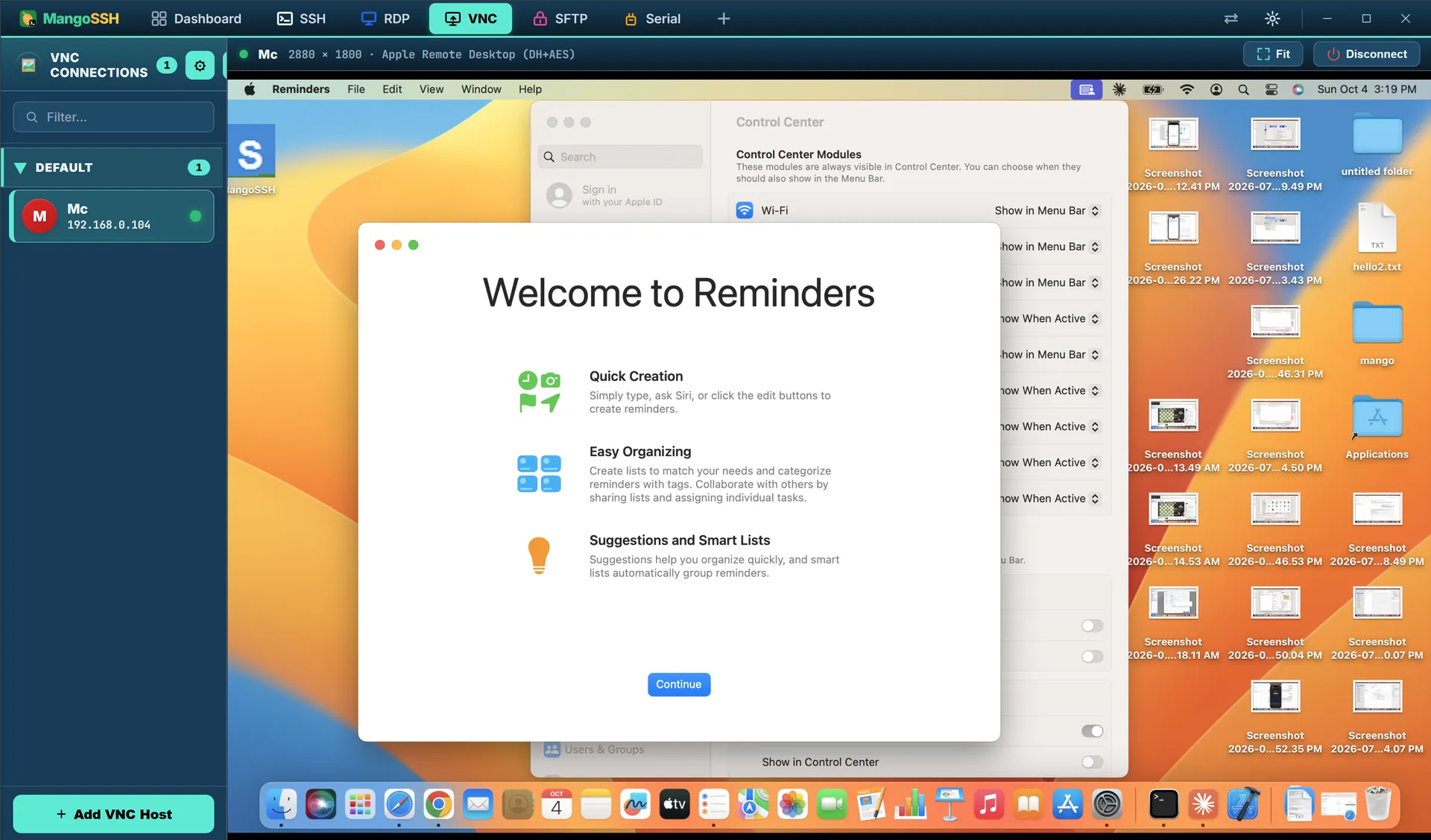
- Windows Remote Desktop opens inside the app, not a separate program
- VNC is built in too, so there is no extra viewer to install
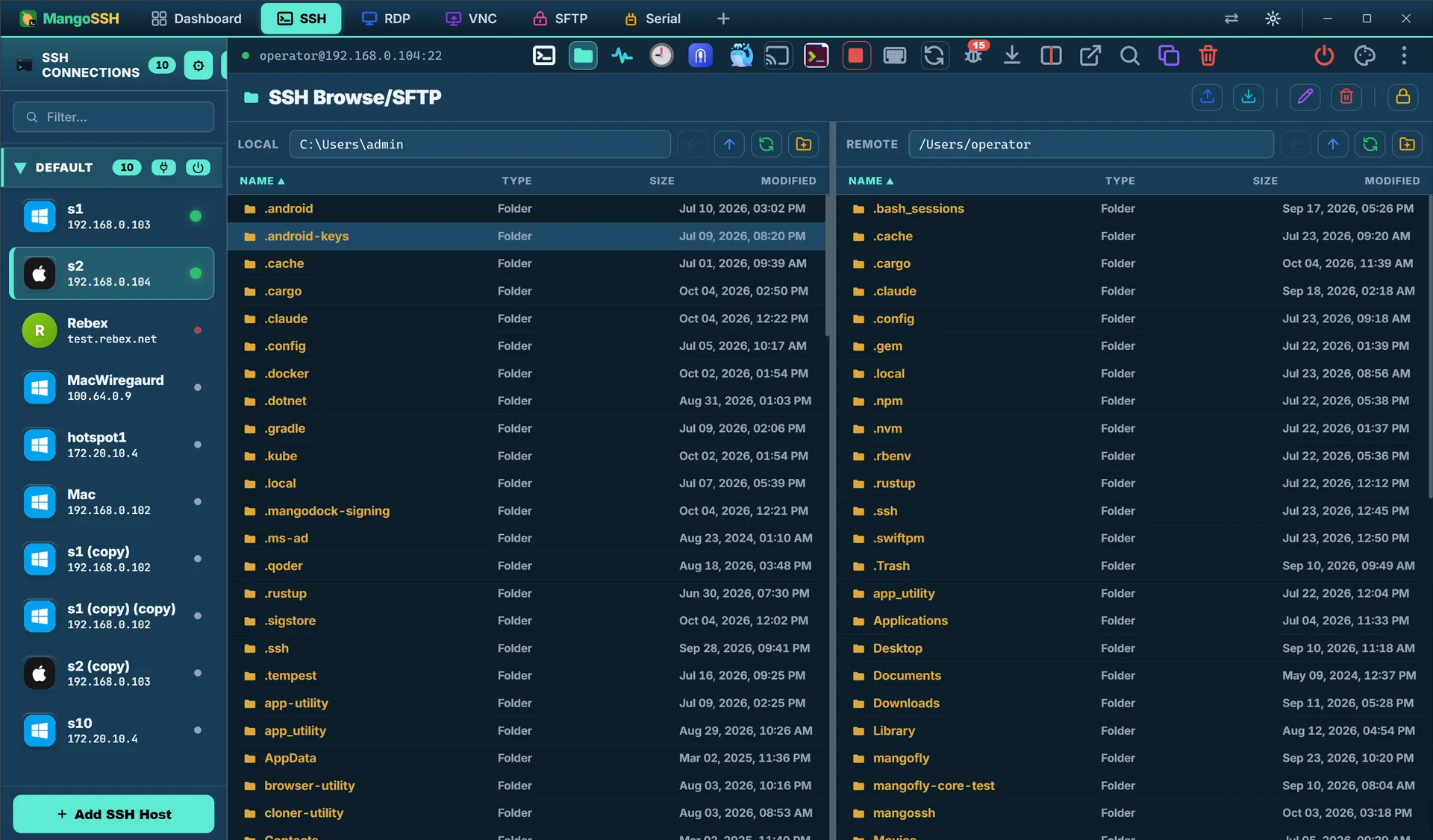
- Browse, edit, rename and set permissions on files without leaving the session
- Talk to switches, routers and devices over Telnet or a serial cable
- Open a shell in a Docker container or Kubernetes pod like any other host
Authentication
- Thirteen ways to sign in, from a plain password to a hardware key
- Tap a YubiKey or a work smartcard instead of typing anything
- Keys can live in your machine's security chip, where nothing can copy them out
- Hop through a jump host automatically on the way to your server
- Remembers each server's fingerprint and refuses to connect if it changes
- Revoked certificates are turned away before a connection opens
Vault & Security
- Your saved servers are encrypted on disk from the first launch
- Passwords are held by Windows, macOS or Linux itself — never left in a file
- Optional Windows Hello or Touch ID check before a password is shown or copied
- Sync between your machines without the server ever seeing your secrets
- Share a vault with your team, with every machine encrypted separately
- A strict mode that switches off older, weaker encryption entirely
Sessions
- See every open session at a glance and pin the ones you live in
- Two side by side in one pane, or a live session shared with a colleague
- Type once and send the same command to every server you picked
- Group servers by environment and connect to a whole group at once
- Record a session and replay it, or search back through the scrollback
- Replay a sequence of keystrokes you find yourself typing often
Monitoring & Audit
- Every connection, failed attempt and disconnect is written down
- Entries are linked together, so deleting or editing one becomes obvious
- One click checks the log and points at the first altered line
- Passwords never reach the log in the first place
- Every saved server is polled in the background, connected or not
- Tells you before a certificate expires and what is due for rotation
Automation
- Run a script across a whole fleet at once, not one server at a time
- Chain steps into a runbook that resumes where it stopped if the app closes
- Schedule a script, or put it behind a hotkey
- Let an AI tool drive your servers through a policy that can refuse it
- Ask for help reading a terminal, with likely secrets removed first
- Nothing leaves until you have seen exactly what would be sent
Zero Trust & Relay
- Connect through AWS, Google, Azure, Cloudflare, Teleport or Tailscale
- MangoSSH works out the right settings for each one so you do not have to
- Access is issued for about five minutes, then expires by itself
- Request access, have it approved, and watch it lapse on its own
- Hand someone a session without handing over the password
- Nothing long-lived is written to disk for someone to find later
Network Tools
- Forward ports without having to remember any command-line flags
- Keep folders continuously in sync between machines
- Use cloud storage like a normal drive — S3, Google Drive, Dropbox, WebDAV
- Compare two folders side by side and fix the differences in place
- Scan a network range, wake a machine remotely, benchmark a link
- Import the servers you already have instead of retyping them
Air-gapped edition
- A separate build with the internet code removed, not switched off
- No telemetry, no analytics, no account, nothing to phone home
- Every server address is one you type — relay, vault, approvals
- One signed installer, and nothing downloads after it
- Each release is checked for leftover external addresses before it ships
- The threat model is published — including the parts not yet solved
Inside the app
Many views, one window
Dashboard, terminals, remote desktops, scripts, runbooks and the session log. Each one links to its documentation.
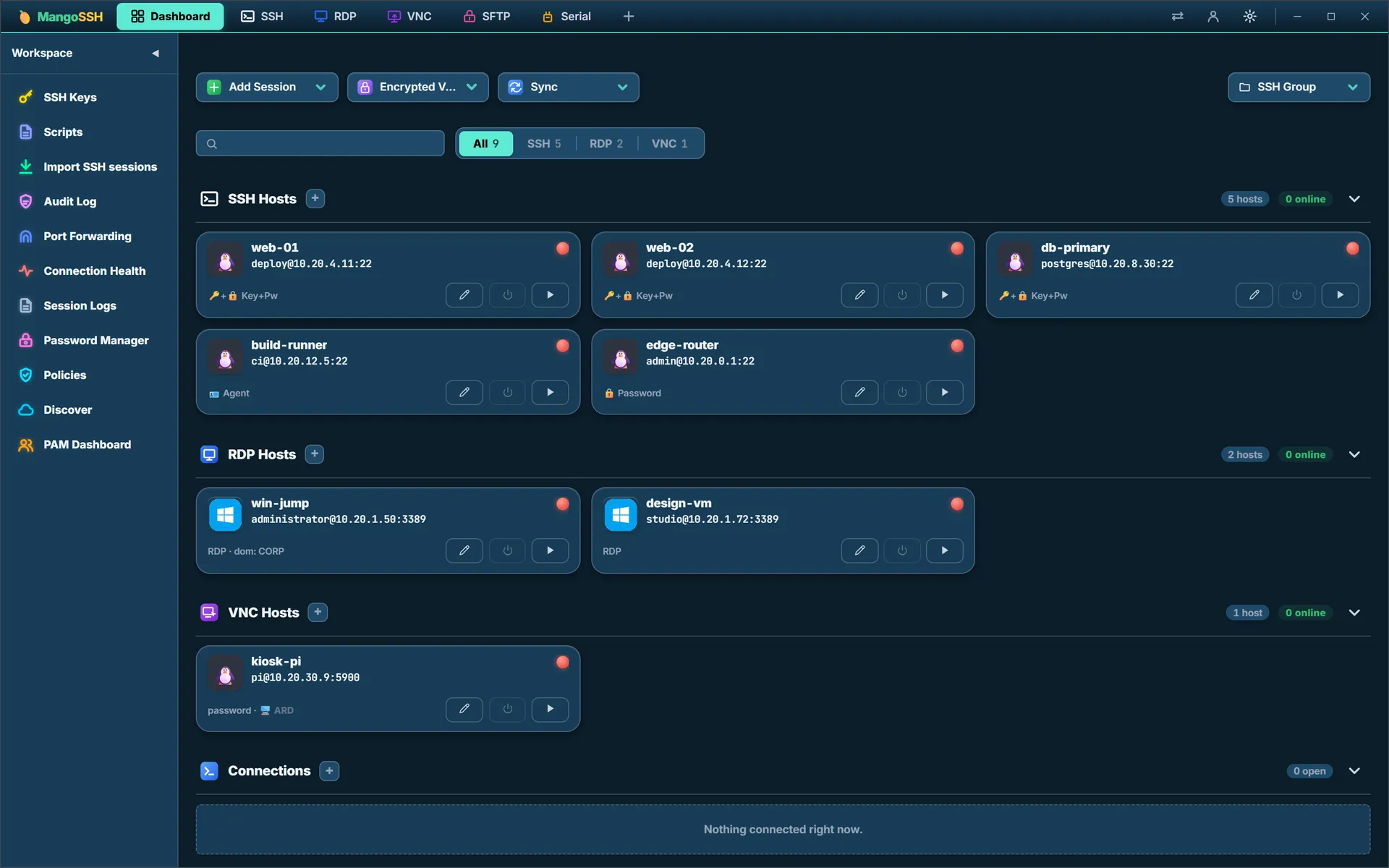
Dashboard
Every saved connection in one place, grouped by protocol, with live status and one click to connect
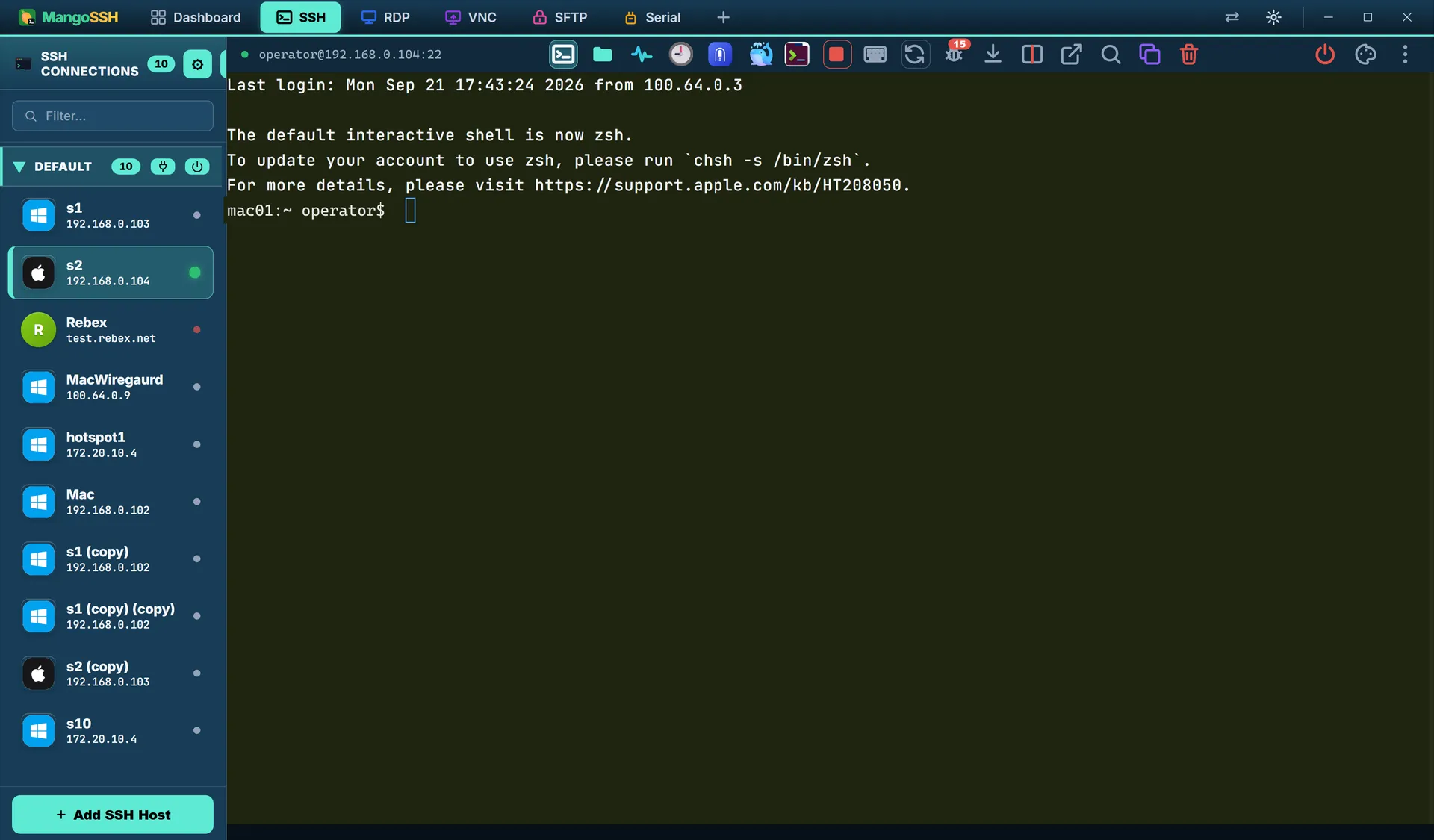
SSH
Multi-session SSH with thirteen ways to sign in — password, key, agent, smartcard or your machine's own security chip
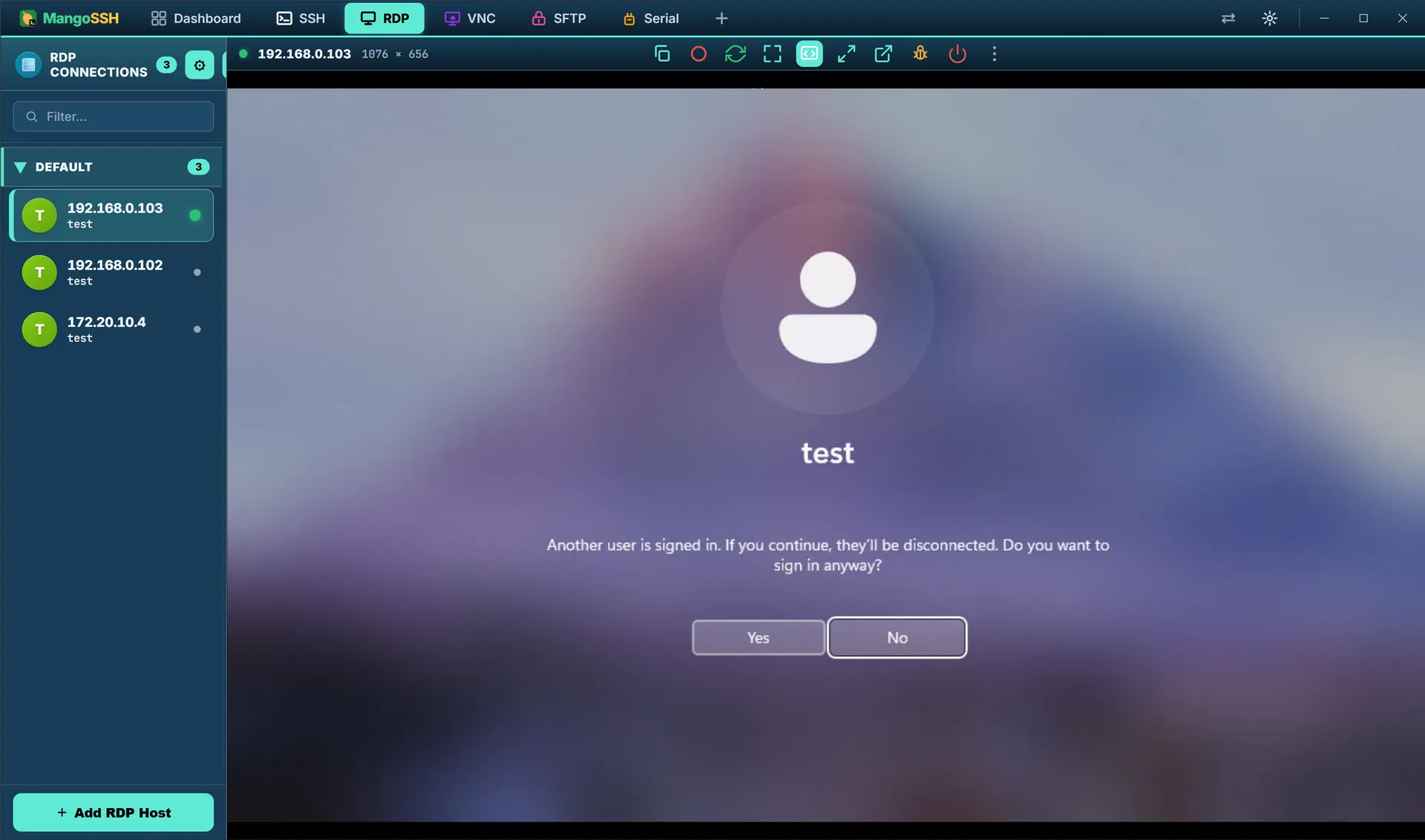
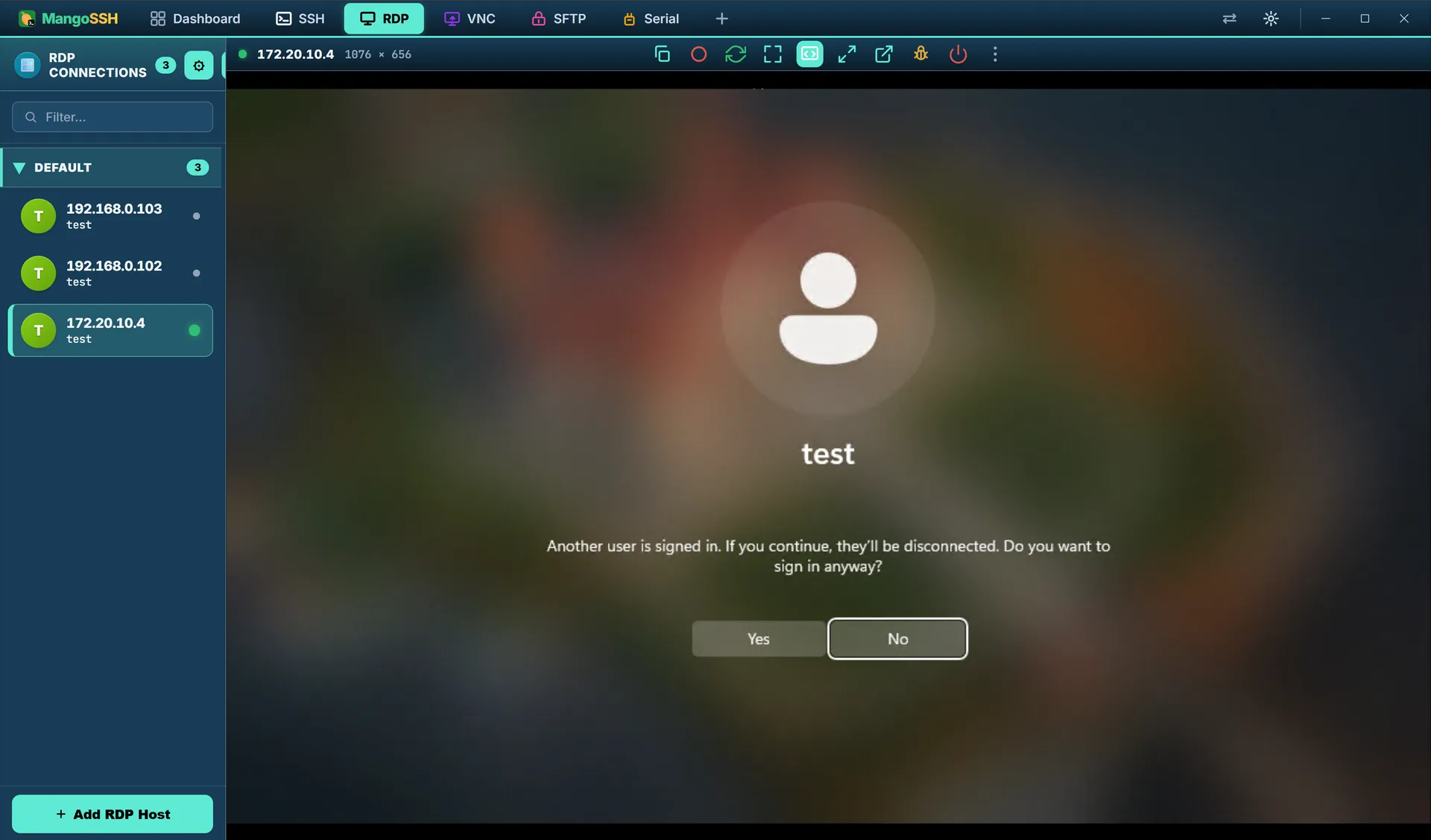
RDP
Windows desktops render inside the app — no mstsc, no second window, the same saved-host list as everything else
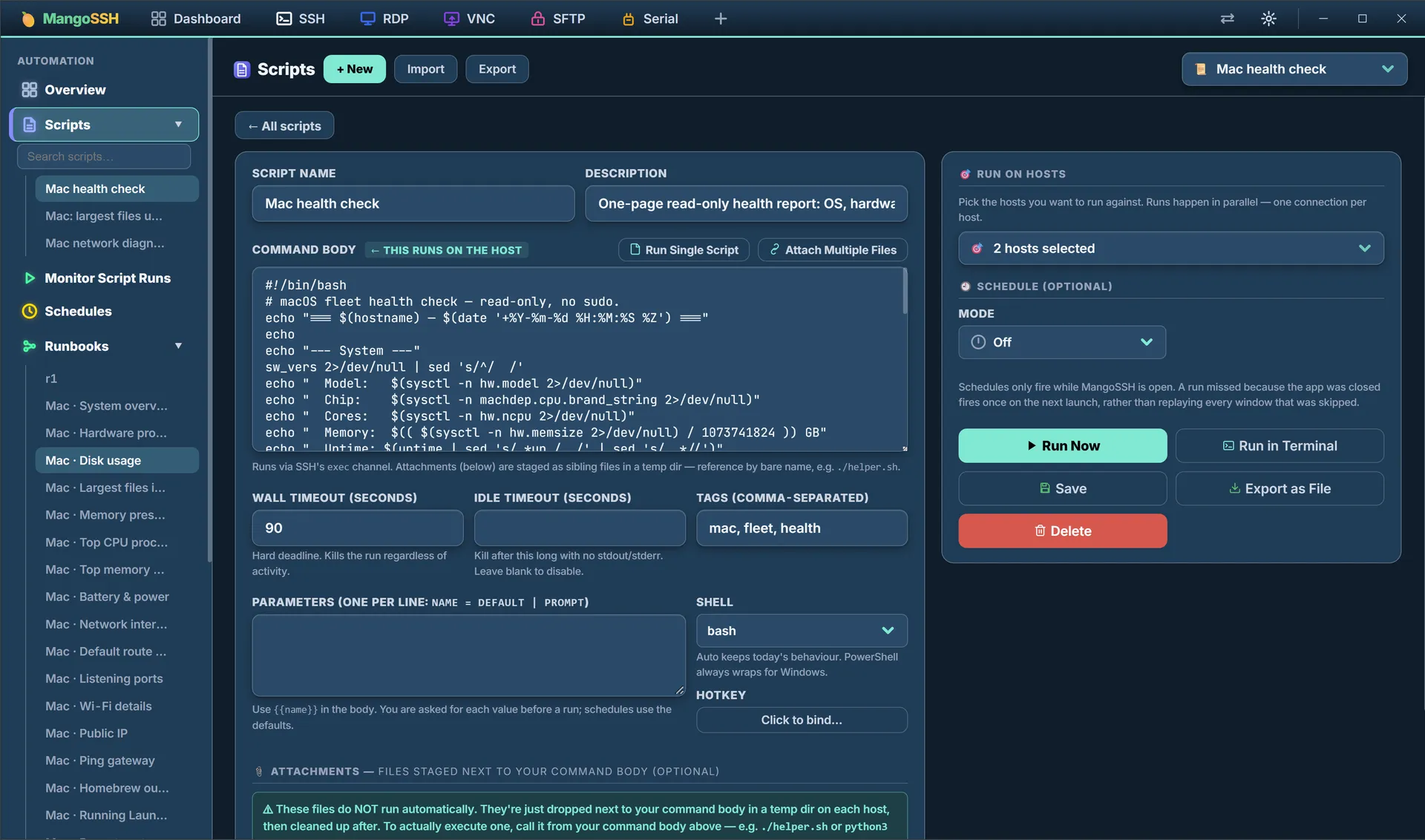
Scripts
One script across a whole fleet in parallel, with timeouts, prompted parameters and an optional schedule
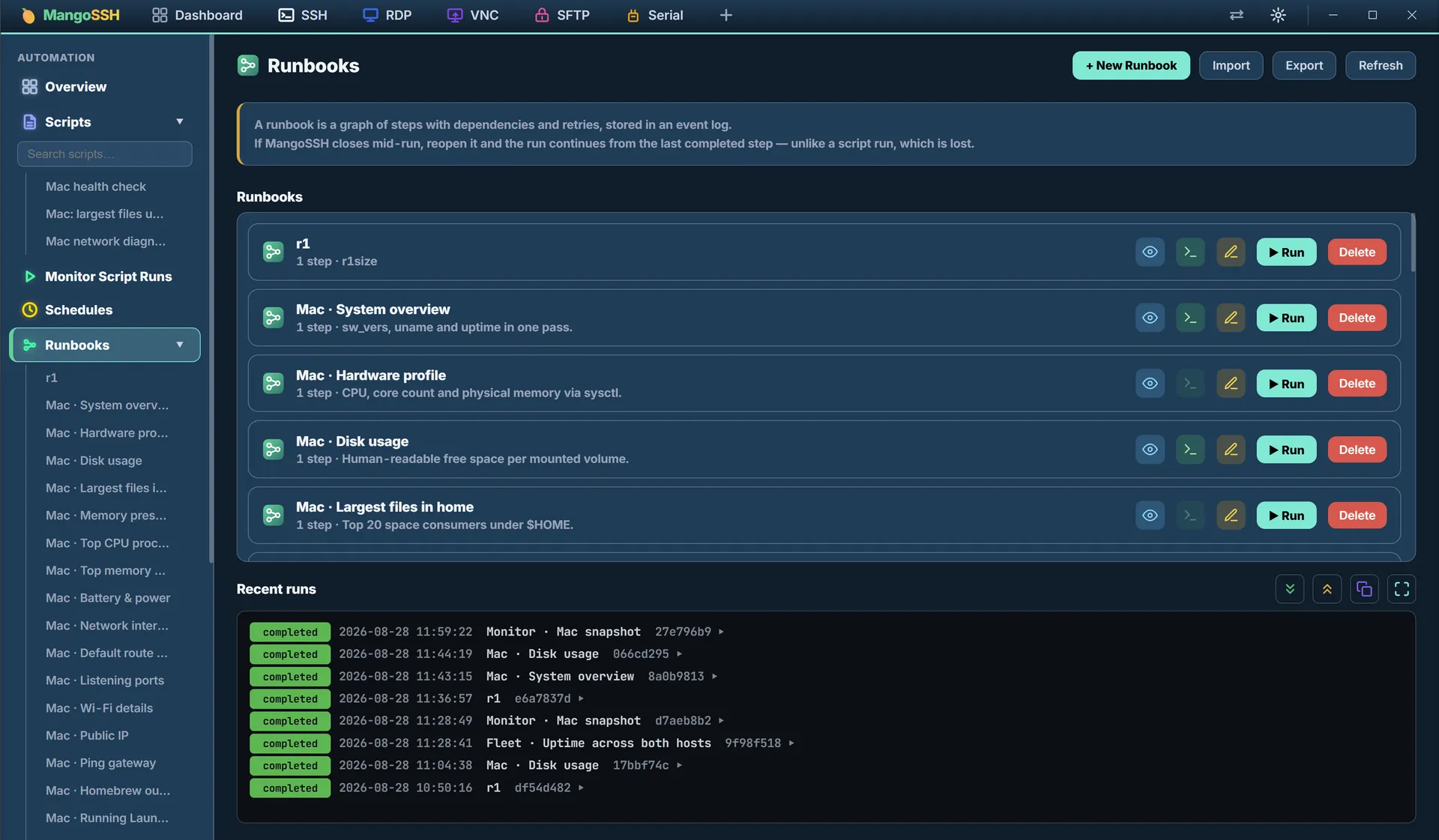
Runbooks
Steps with dependencies and retries, kept as an event log that resumes where it stopped if the app closes
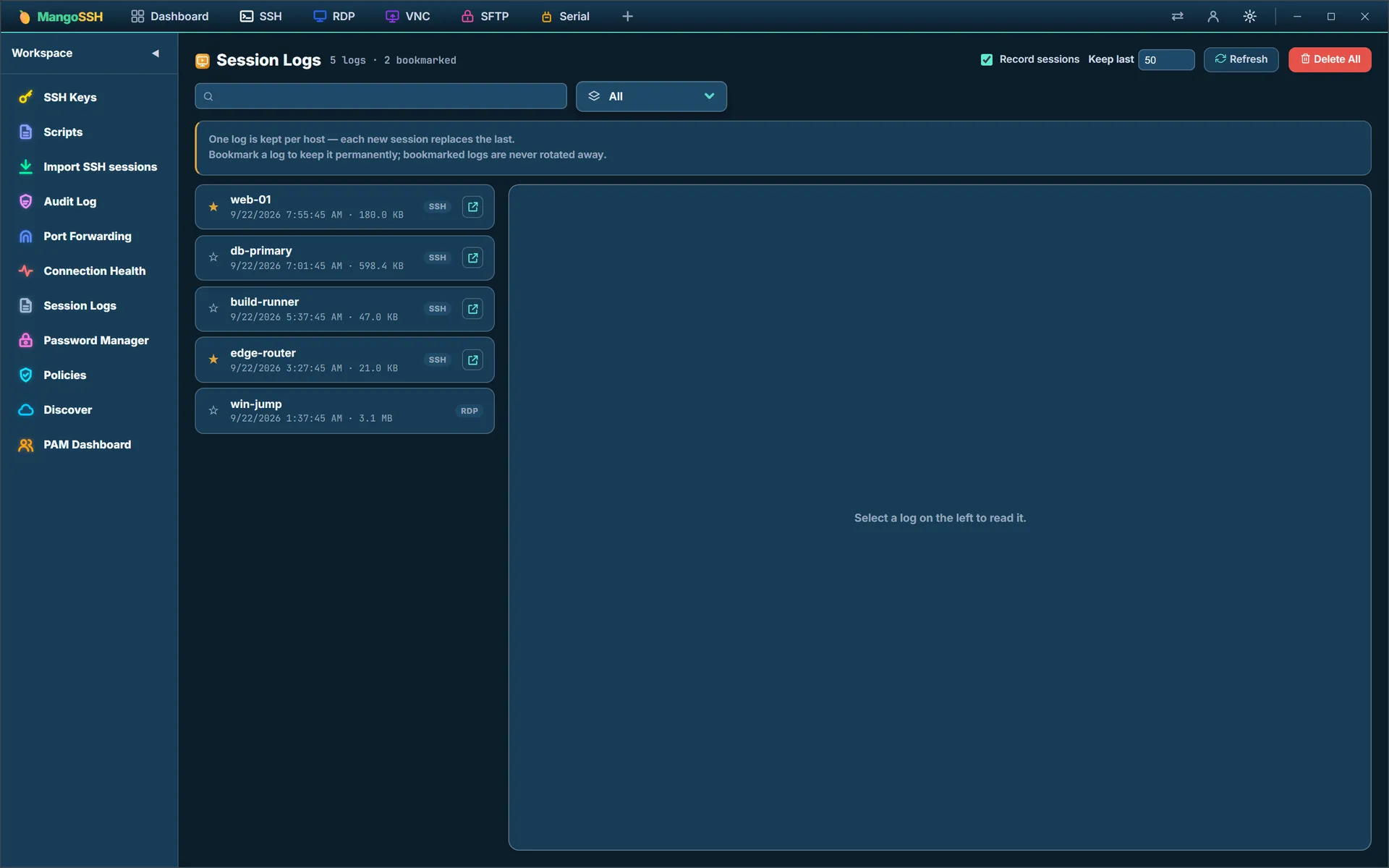
Session logs
Recorded sessions kept per host, bookmarked to survive rotation, and readable long after they ended
AI & MCP
Let an agent run your fleet, without handing it the keys
Two separate surfaces, pointing opposite ways. An MCP server lets the AI tool you already use drive your saved hosts. An in-app assistant reads a terminal you are looking at and helps you make sense of it. Both are opt-in, and neither one is ever handed a credential.
MCP server
Model Context Protocol over stdio, so Claude Desktop, Cursor or any MCP client can work your hosts.
mangossh --mcpssh_list_hostsDiscover what is saved — name, host, port, user, group, protocol.ssh_runRun a command on one host and read back stdout and stderr.ssh_run_on_groupThe same command across every host in a group, with per-host results.ssh_pingCheck reachability on the SSH port. Needs no credentials at all.
The agent asks for outcomes, not materials
It says “run this there” rather than “give me the password so I can run it myself”. The MCP server is a separate process with no vault, no keychain and no window — the app holds all three, does the work, and returns the result.
Three answers, not two
Every proposed command is allowed, refused, or escalated to you. Escalation is a real prompt showing the host and the exact command; declining it, closing the window or simply not answering are all refusals.
Some things no approval unlocks
Reading credentials, recursive deletion and stopping services are denied outright rather than offered for confirmation, because the blast radius is unbounded or unrecoverable.
It lands in the same audit chain
An agent's command is written to the hash-chained audit log by the one process that owns it — the same record a human session leaves, not a parallel one.
In-app AI Assistant
Reads the session you are looking at, when you ask it to, and never on its own.
Manual invoke only
No passive scanning of terminal output, no background analysis, nothing watching. It reads the recent output of the session in front of you at the moment you ask.
Secrets are stripped before you are even asked
AWS access key IDs, whole PEM private-key blocks, anything shaped like password=, token= or api_key=, and Authorization: Bearer headers are redacted out first.
You approve the redacted text, then the command
Nothing is sent until you have read exactly what would go. A suggested fix is typed into the terminal rather than submitted, and still needs you to press Enter.
Your provider, your key
Anthropic, OpenAI, Google Gemini, Groq, OpenRouter, Cloudflare Workers AI, or any OpenAI-compatible endpoint. The key lives in the operating system's keychain.
Or keep it on the machine
Ollama is one of the presets. Point the assistant at a local model and the terminal output never leaves the box at all — which is the only version of this that an air-gapped network can use.
The agent never sees a credential. It runs as its own process with no vault, no keychain and no window, so there is nothing in it to leak — every command is carried out by the app and only the result comes back.
Automation, MCP and the assistant in the docs →Where MangoSSH is ahead
Three things most remote-access tools make you rent
Shared vaults, browser sessions and privileged-access controls are usually the paid tier, hosted by the vendor. Here they are in the product, on infrastructure you run.
Vaults
Four places to keep a secret — and you can host the shared one
Start with the OS keystore and never think about it again, or turn on an encrypted vault, or share one across a team. The team tiers are the point: the sync server is yours to run.
- OS keystoreThe default. Passwords and passphrases live in Windows Credential Manager, macOS Keychain or the Linux Secret Service — never in the host file.
- Encrypted vaultOpt-in. The whole host store behind an Argon2id-derived AES-256-GCM key, with a unique nonce per write and an auth tag, so a tampered file fails to decrypt rather than failing quietly.
- Team VaultA shared folder and a keypair per device. No server to run at all — useful when a team already shares storage.
- Self-hosted Cloud VaultThe same vault, synced through a server you deploy: Docker Compose, Postgres, and a reverse proxy in front. A €5 VPS or a NAS is enough.
- It cannot read your vaultEvery record reaches the server as a ciphertext blob the client already encrypted. The master password and the derived key never leave the device.
- No accounts anywhereThere is no signup. Each device has an Ed25519 keypair generated locally, the private half stays in its OS keychain, and the server only ever learns a public key.
Shared credentials without handing them to anybody — including us.
Clientless access
SSH and RDP in a browser tab
Send somebody a link and they get a session — no install, no agent on the viewing device. The same relay you self-host serves it.
- SSH in the browserA real terminal on xterm.js, served by the relay itself. Open a share link and you are at a prompt.
- RDP in the browserA full RDP engine compiled to WebAssembly, drawing to a canvas and capturing keyboard and mouse — a Windows desktop in a tab.
- VNC tooThe same treatment for RFB, for the headless Pi and the x11vnc box.
- Nothing fetched from a CDNThe client is compiled into the relay binary. A relay on an isolated network still serves a working page, which is the whole reason it is not a script tag pointing at the internet.
- Session recordingBrokered desktop sessions can be recorded server-side and played back.
- You run the relayIt is a container in this repo, not a service anybody else operates. Sessions do not traverse infrastructure you do not own.
The clientless form factor, without a vendor in the middle of the session.
Privileged access
The credential never reaches the client
A brokered host has no password on your machine at all. The client presents a short-lived signed ticket; the relay holds the real credential and opens the session for you.
- Credential brokeringA brokered host stores nothing client-side. The device fetches a server-signed ticket proving it may use a record, and the relay connects on its behalf with a credential only it holds.
- Just-in-time accessTime-boxed grants that are requested, approved or denied, and revoked — against the same self-hosted vault, so the approval trail is yours.
- Key rotation, planned before performedRotation reads a host's authorized_keys over a live session and shows exactly which commands it would run, generating no key material until you accept. It is the one operation that can lock you out of a server.
- Fleet policiesGovernance as a rule with a scope and a mode rather than a checkbox per host: require JIT, force recording, enforce strict crypto, set a certificate TTL or a key-age limit across a group or a tag.
- Your own SSH CA and revocationIssue short-lived certificates, and publish a key revocation list the clients honour.
- An audit log you can readLine-delimited JSON on disk, with vault downgrades flagged in red — you cannot quietly turn the vault off without it showing.
Brokering, JIT and rotation are what the enterprise tools charge for.
Security
Built to be audited, not trusted
No telemetry, no phone-home, no account to create. Every claim below is something you can check on your own network, with your own packet capture.
- 01
Air-Gapped
The same product with the outbound code left out of the binary.
- Anyone can run it — Solo admin, MSP or mid-sized company — one binary, no tiers or seat counts.
- Not a setting — The editions split at compile time. The code is absent, not disabled.
- Checked on what ships — Each release greps the built binary for fourteen external hostnames. One match fails it.
- Nothing to fetch or activate — No licensing module, no package manager, no update ping. One signed installer.
- Every address is yours — Relay, vault, CA and brokers each take a URL you type.
- Evidence stays put — Audit log, recordings and history live on disk and export by hand.
Built for defence networks, OT and ICS floors, card-data and clinical environments, and places with no connectivity at all.
How the split works → - 02
Trust
What has actually been hardened. Each one is checkable.
- Terrapin mitigated — strict-kex on every handshake (CVE-2023-48795).
- Weak algorithms removed — Strict mode drops ssh-rsa, SHA-1 KEX, CBC and HMAC-SHA1.
- Host keys pinned — A later mismatch refuses the connection outright.
- Secrets never hit the host list — They go to the OS keystore; the file gets a flag, not a value.
- Encrypted at rest by default — AES-256-GCM from first launch, with no setup.
- Tamper-evident audit — Each line is hash-chained to the last. Credentials are never logged.
- Credentials can stay hidden — The PAM broker connects a user without handing over the password.
- 03
Security
The threat model, including what it does not defend against — the part most tools leave out.
- Your traffic is not brokered — Sessions go straight from your machine to the host.
- Relays hold no credentials — They broker the connection, nothing more.
- Protects a lost device — Encryption at rest covers a stolen laptop or a copied disk.
- Does not protect a live session — Malware running as you reaches the same secrets — the limit of every desktop credential store.
- Checkable, not trusted — No telemetry, no analytics, no account.
Where compliance stands
MangoSSH is built for environments governed by PCI DSS, HIPAA, ISO 27001 and defence accreditation regimes — session recording, tamper-evident audit, per-use privileged access and no egress are the controls those regimes ask for. Being built for a regime is not the same as being certified against one, and this page does not claim otherwise.
- SOC 2 Type II — In progress.
Download
One binary. No account.
Nothing to sign up for. Download it, run it, and it works offline from the first launch.
Internet edition
The full build. Zero-Trust tunnels, relay, cloud vault and everything else that needs a network.
Air-gapped edition
The same application with every outbound code path absent from the binary rather than switched off — so it can be audited, not just trusted.
Self-host the servers
Optional. Run your own relay and vault server for team sync, remote access and the PAM Broker. Each bundle holds a pre-built Docker image and an installer; unpack it on a Linux server and run install.sh.
- Vault serverTeam sync, roles, JIT, SSH certificates, SSO · Linux x86-64Download
- RelayPersistent sessions, Connect by ID, PAM Broker · Linux x86-64Download
Installing the vault server · Installing the relay · Verify against SHA256SUMS-selfhost
Verify a download against SHA256SUMS for 1.0.101.
Windows and macOS will warn you the first time. These builds are not code-signed yet, so both show their unknown-developer dialog on first launch. Code signing is in progress. Until it lands, the SHA-256 checksums published with every release are how you confirm the file you have is the file we built.
Windows · SmartScreen
- If the browser flags the download itself, choose Keep.
- Run the installer. A blue “Windows protected your PC” dialog appears.
- Click More info, then Run anyway.
macOS · Gatekeeper
- Open the .dmg and drag the app into Applications.
- Launch it once. macOS refuses, saying the developer cannot be verified.
- Open System Settings → Privacy & Security and scroll to Security. The blocked app is named there, with an Open Anyway button.
- Click it, then confirm with Open. On macOS 14 and earlier you can instead Control-click the app and choose Open.
Running an isolated network? Every release also builds MangoSSH Secure, the air-gapped edition, with the outbound code left out of the binary rather than switched off.
Pricing
Free for one person. Paid where a team shares things.
Everything that runs on your own machine stays free, including the air-gapped edition. The paid tiers are for what a team needs between machines — shared credentials, identity, a relay and an audit trail.
Free
The whole client, on your own machine.
$0for one person, foreverDownload- SSH, RDP, VNC, SFTP, Telnet and Serial in one window
- Encrypted vault, with the key in your OS keychain
- Scripts across many hosts, and durable runbooks
- Session recording and an audit log on disk
- The air-gapped edition, with no outbound code paths at all
- No account, no telemetry, no expiry
Team
For people who share hosts and credentials.
$10per user, per monthStart free- Everything in Free
- Self-hosted Cloud Vault — shared credentials on your own server
- Three roles, enforced on the server: admin, operator, viewer
- SSO over OIDC, LDAP and Active Directory, and two-factor
- The relay: persistent sessions and Connect by ID
- SSH and RDP in a browser tab
Enterprise
For estates with an auditor.
$20per user, per monthContact sales- Everything in Team
- PAM broker — the credential never reaches the client
- Just-in-time access, with approval gates
- Your own SSH CA, key rotation and revocation
- Fleet policies and device-posture checks
- Help deploying into air-gapped and regulated networks
The free tier is not a trial. It does not expire, it is not limited by host count, and the air-gapped edition is included in it.